

Screenplay formatting can feel more complicated than the story itself when you are writing your first script. Scene headings, character names, dialogue, action, transitions and page layout all follow familiar conventions so that a screenplay can be read quickly by writers, actors and production teams.
The good news is that you do not need to memorise every detail before you start. Learn the basic screenplay elements, understand what each one is for, and let screenwriting software handle the repetitive formatting while you focus on the story.
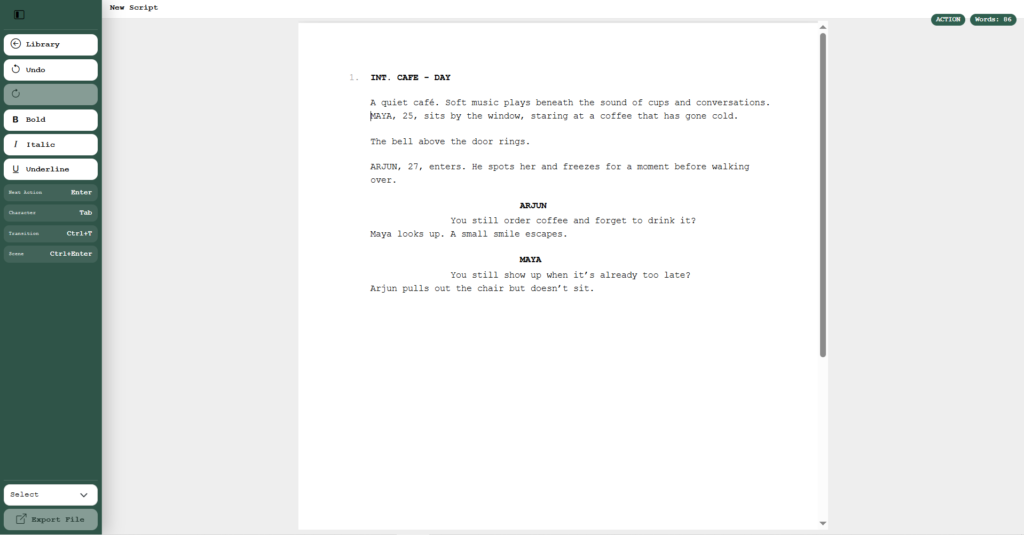
What is screenplay formatting?
Screenplay formatting is the standard way a film or television script is laid out on the page. It gives each type of information its own visual position and style. A reader should be able to tell immediately whether a line is a scene heading, action, a character cue or dialogue.
Professional screenplay format commonly uses a monospaced 12-point Courier-style font and consistent margins. The Academy Nicholl screenwriting resources note that professional scripts can vary slightly in detail while still following recognisable formatting conventions. A frequently used rule of thumb is that one properly formatted screenplay page represents roughly one minute of screen time, although the real timing of a scene can vary.
The main elements of a screenplay
1. Scene headings
A scene heading, sometimes called a slugline, tells the reader where and when a scene takes place. It normally begins with INT. for an interior scene or EXT. for an exterior scene, followed by the location and time of day.
Example:
INT. COFFEE SHOP - DAY
Keep scene headings short and consistent. If you return to the same location later, use the same location name whenever possible. This becomes especially useful during production because scenes can later be grouped by location.
2. Action
Action describes what the audience can see and hear. It is normally written in the present tense and should be easy to scan.
Instead of explaining what a character is thinking, describe something that can be shown on screen. Shorter action paragraphs usually make a screenplay easier to read than large blocks of prose.
Example:
Ravi pushes the door open. The room is empty except for a radio playing in the corner.
3. Character names
When a character speaks, their name appears above the dialogue in capital letters. Use the same character name throughout the screenplay unless there is a deliberate story reason to change it.
Example:
RAVI
4. Dialogue
Dialogue appears directly below the character name. Screenplay software normally handles the indentation automatically, so you can concentrate on the words rather than measuring the page.
Good screenplay dialogue is usually written to be spoken aloud. Reading scenes out loud can help reveal lines that feel too long, too formal or unnatural.
5. Parentheticals
A parenthetical is a short direction placed between the character name and dialogue. It can clarify how a line is delivered or what a character is doing while speaking.
Example:
(quietly)
Use parentheticals sparingly. If the intention is already obvious from the scene, the actor and director usually do not need an additional instruction.
6. Transitions
Transitions indicate how one scene moves into the next. Examples include CUT TO: and FADE OUT. Modern scripts often use transitions less frequently than older screenplays because a simple new scene heading is usually enough to indicate the change.
How to format the title page
A simple screenplay title page normally contains the screenplay title, the writer credit and appropriate contact information. Keep it clean. A title page is not a movie poster, so decorative graphics are usually unnecessary unless a specific submission guideline asks for them.
Common screenplay formatting mistakes
Beginners often make formatting more complicated than it needs to be. Some of the most common problems are:
- Writing scene headings as full sentences instead of clear location and time information.
- Changing the name of the same location from scene to scene.
- Writing action in the past tense instead of the present tense.
- Using very long action paragraphs that slow down the read.
- Overusing parentheticals and directing every line of dialogue.
- Manually spacing dialogue and character names in a normal word processor.
- Using inconsistent character names.
- Adding unnecessary camera directions to every scene.
Do you need screenwriting software?
You can technically write a screenplay in a normal word processor, but maintaining screenplay formatting manually quickly becomes distracting. Dedicated screenwriting software automatically keeps common screenplay elements in the correct format and lets you move between them while writing.
Paper Bark is built around that workflow. It supports common screenplay elements such as scene headings, action, character names, dialogue and transitions, while keeping projects organised in a central dashboard.
You can explore the current Paper Bark screenwriting features to see how the writing workflow works.
Writing on Windows or Mac
Your operating system should not change the way a screenplay is formatted. The important part is choosing a writing environment that lets you focus on the script and reliably export a professional document.
Paper Bark is available as screenwriting software for Windows and screenwriting software for Mac. Projects can be stored locally, with optional cloud synchronisation for selected projects, and completed screenplays can be exported as PDF files.
A simple screenplay formatting checklist
- Use a consistent screenplay font and layout.
- Begin each new scene with a clear scene heading.
- Write action in the present tense.
- Keep character names consistent.
- Let dialogue formatting remain consistent throughout the script.
- Use parentheticals only when they genuinely clarify the line.
- Keep transitions purposeful rather than adding them automatically.
- Check the title page before exporting or sharing the screenplay.
- Export a PDF and read it once as a reader, not only as the writer.
Focus on the story, not the spacing
Formatting matters because it creates a shared language between the writer and everyone who may eventually read, perform or produce the script. But formatting should eventually become invisible.
Once the structure is set correctly, your attention should return to the scene: what the character wants, what changes, and why the audience should keep reading.
If you are ready to start writing, explore Paper Bark screenwriting software and build your screenplay from the first scene onward.